Scam Alert: Free Voucher ‘Selfie’ Promos That Hijack Your Bank App
Fraudsters posing as promoters are using a quick selfie for a free voucher or airtime to link their phone to victims' banking apps. Learn the warning signs before the Black Friday rush.

In this article
- What is being reported
- How the scam works, step by step
- Warning signs
- How to protect yourself
- Treat your face like a PIN
- Keep your phone in your hand
- Read every approval prompt
- Verify promotions independently
- Turn on alerts and check linked devices
- Advice for businesses and employers
- What to do if you are a victim
- What you should do
- Sources
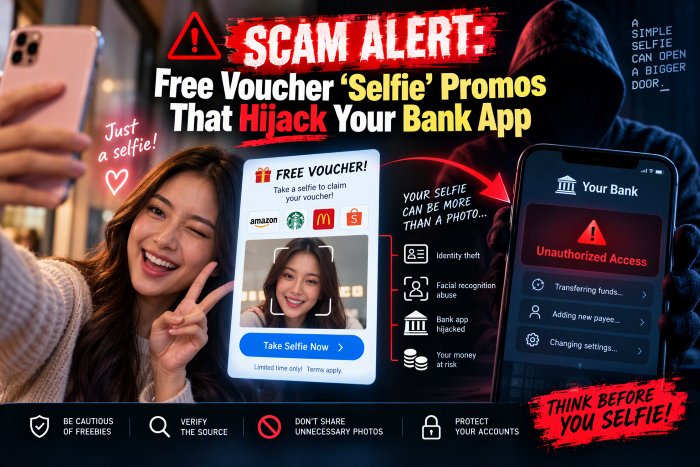
A friendly promoter in a shopping mall offers you free airtime, a shopping voucher or a loyalty reward. All you need to do is share a few details and take a quick selfie. It feels harmless. But financial watchdogs and banks in South Africa are warning that this “face scan” is being used to hijack people’s banking apps, and with Black Friday approaching on 27 November, the trick is likely to travel. Here is how it works, the warning signs, and how to protect yourself and your staff.
What is being reported
South Africa’s National Financial Ombud Scheme (NFO), an independent body that handles complaints about banks and other financial services, has warned consumers about a rising banking scam built around facial verification. The NFO says formal fraud complaints it closed between January and September 2026 rose by about 27.5 percent compared with the same period in 2025, from 2,389 to 3,045.
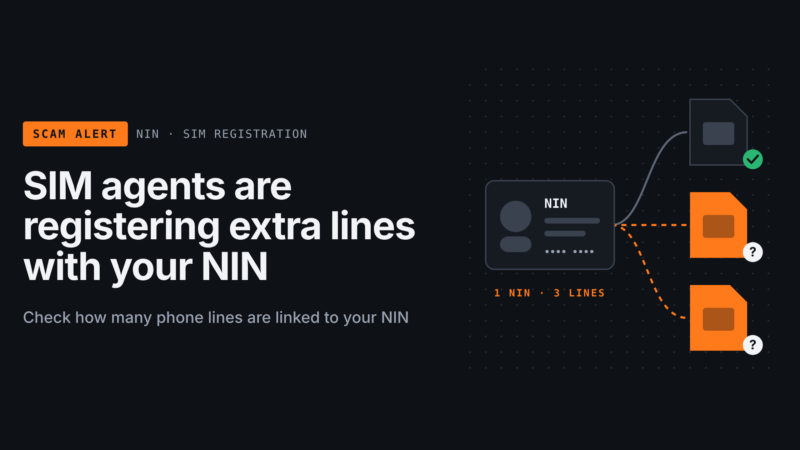
Nedbank has published a similar warning about a “fake selfie-verification” scam in which criminals pose as cellphone or retail store staff. Many Nigerian banks and fintech apps also use selfies and face checks to approve new devices or confirm identity, so the same technique can be used against customers here.
How the scam works, step by step
- The approach. Fraudsters set up in a shopping centre, market or other busy place, posing as staff of a real business. They offer something attractive: free airtime, a voucher, or sign-up to a rewards programme.
- The “registration”. They ask for personal details such as your full name, phone number or ID number.
- The selfie. They ask you to take a selfie or scan your face, often on their own device, saying it is needed to register you for the promotion.
- The hidden purpose. In reality, the face scan is used to approve the registration of the fraudster’s device on your banking profile. Nedbank describes criminals registering victims on its banking app using the fraudster’s own phone number.
- The phone hand-over. They may ask to hold your phone “to complete the process”, then quietly approve the in-app or SMS request that confirms the new device.
- The takeover. With your bank profile now on their phone, they can change contact details, intercept notifications and move money from linked accounts.
Warning signs
- An unsolicited offer in a public place that seems too generous for what you are asked to do.
- Anyone asking you to scan your face or take a selfie on a device that is not yours.
- A request to hand over your unlocked phone, even for a moment.
- Requests for your ID number, BVN, NIN or other identity details in a casual setting.
- Pressure to act right now before the “promo ends”.
- A banking notification, approval prompt or OTP you did not expect.
The NFO sums up the urgency trap neatly: if it has to be now, then it has to be no.
How to protect yourself
Treat your face like a PIN
Your face is now a key to your money. Do not scan it for anyone unless you started the process yourself, on your own device, inside your bank’s official app.
Keep your phone in your hand
Never give an unlocked phone to a stranger. If a promoter says they need your phone to finish a sign-up, walk away.
Read every approval prompt
Do not approve any banking notification, device-link request or authentication message you do not understand or did not start. Read it fully before tapping anything.
Verify promotions independently
If a store or network operator is really running a promotion, you can confirm it at the customer service desk or on the company’s official website or social media page. Go there yourself rather than trusting the person who approached you.
Turn on alerts and check linked devices
Enable transaction and login alerts in your banking app, and if your app shows registered devices, check that list regularly and remove any you do not recognise.
Advice for businesses and employers
- Brief staff, especially those who handle company accounts on their phones, about this scam before the Black Friday and festive season rush.
- Make it company policy that nobody approves a banking prompt they did not personally start.
- If you run genuine in-store promotions, tell customers clearly that your staff will never ask for a selfie, an OTP or their phone.
- Use separate business banking with approval rules, so a single hijacked personal app cannot move company funds.
What to do if you are a victim
- Call your bank immediately using the number on the back of your card or in the official app, and ask them to block access and remove unknown devices from your profile.
- Keep evidence: SMS messages, emails, screenshots, transaction records and a description of the person and location.
- Change your banking app PIN and passwords once your bank has secured the account.
- Report the crime. In Nigeria, report to your bank’s fraud desk and the police. In South Africa, the NFO can help if you are unhappy with your bank’s response.
What you should do
This week, share this warning with family, especially older relatives and young people who often shop in malls, and with your staff. Remember three rules: no selfies for strangers, no phone hand-overs, and no approving prompts you did not start. A free voucher is never worth handing over the keys to your bank account.
Sources
Have you come across this scam?
Was this article helpful?

adminVerified expert
Cybersecurity Analyst — 20 years experience
Federal Capital Territory (Abuja)
Credentials: MCPN, MNCS, IAENG | System Analyst · Web Developer · CEH · CC · CDST
Got expertise to share? Write for us →