Scam Alert: Fake NCC Phone Verification Sites Stealing OTPs
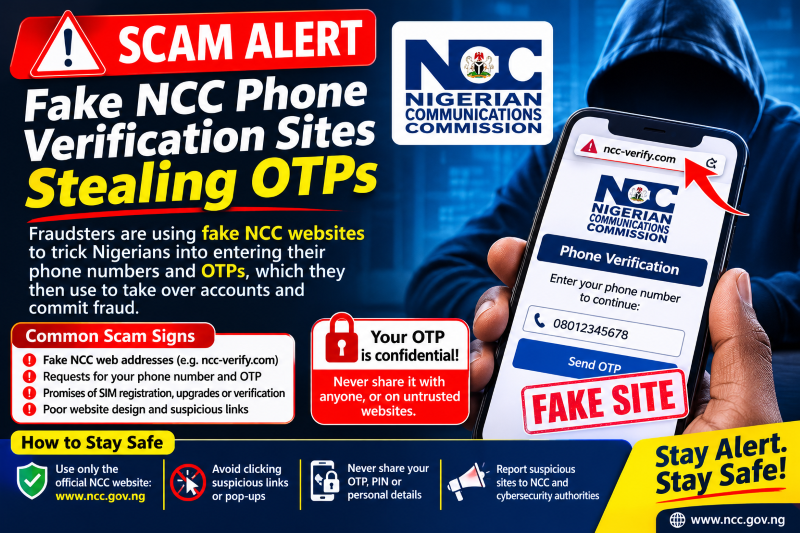
Fraudsters are copying the NCC's device verification portal to steal OTPs, bank details and fees. Learn the fake domains, the warning signs and the official ways to check your phone.

In this article
Since the Nigerian Communications Commission (NCC) launched its phone verification system in October, many Nigerians have been checking whether their devices are approved for local networks. Fraudsters have noticed. The NCC’s own cybersecurity team has warned that fake websites copying the official device verification portal are being used to steal one-time passwords (OTPs), bank details and money. This alert is for phone owners, buyers of new and used phones, phone shop operators and businesses that manage staff devices.
Why this scam is spreading now
The NCC’s device verification system took effect on 7 October 2026. It lets people check whether a phone model has NCC type approval and whether a specific handset, identified by its IMEI number, is verified for use on Nigerian networks. It is meant to help keep counterfeit, cloned and stolen phones off the networks, and reports and confusion about phones that “may stop working” have driven many people to look for ways to check their devices.
Scammers exploit exactly that mix of urgency and uncertainty. On 30 October 2026, NCC-CSIRT, the Commission’s computer security incident response team, issued advisory NCC-CSIRT-2610-040 warning of a phishing campaign impersonating the official portal, verifymydevice.gov.ng. It rated the threat as high probability and high impact.
How the scam works, step by step
- Fake domains are registered. Criminals set up lookalike web addresses. The NCC named these: secure-verifymydevice.ng, verifymydevice.com.ng, embed-ncc.registrmydevice.ng and verifymydevice.ng. Others may appear.
- The real site is copied. The fake pages use the NCC logo and the portal’s look and layout.
- Links are pushed to victims. Unsolicited links arrive by SMS, WhatsApp, email or social media, often warning that your phone must be verified urgently or it will be blocked.
- The padlock creates false trust. The fake sites use HTTPS, so the browser shows a padlock. That only means the connection is encrypted. It says nothing about who runs the site.
- Victims are asked for sensitive data. The pages request OTPs, bank details and personal information, or demand a “registration” or “verification” fee for a service that does not exist.
- Malware may follow. The NCC warned that malicious redirects on these sites may also deliver malware.
With an OTP and bank details, a criminal can take over accounts or approve transactions. Stolen personal data is often reused in follow-up scams.
Warning signs
- A web address that looks similar to, but is not exactly, verifymydevice.gov.ng or ncc.gov.ng. The NCC says legitimate consumer domains end in .gov.ng or .ncc.gov.ng.
- A verification link you did not ask for, sent by text, WhatsApp, email or a social media message.
- Any request for an OTP, card number, PIN or bank login during “verification”.
- Any request for payment to verify or register a phone.
- Threats that your phone will be blocked within hours unless you act now.
How to check your phone safely
Use only the official channels the NCC lists:
- Dial *315# and follow the prompts.
- Visit ncc.gov.ng/devicechecker or verifymydevice.gov.ng by typing the address yourself.
- Call the NCC on 622 for consumer support.
To find your phone’s IMEI, dial *#06#. Dual-SIM phones may show two IMEIs. The NCC says the system works with device identifiers and does not access your messages, photos, files, calls or location. It also says it will never ask for your OTP, bank details or other sensitive information during verification. According to the NCC, phones already connected to Nigerian networks before the system started were automatically verified, subject to any device-specific restrictions.
Tips for buyers and phone shops
Buying a used phone
Buying and selling second-hand phones is still allowed, but check the device’s status with *315# or the official portal before you pay. A successful check confirms regulatory status only. It does not tell you about the phone’s physical condition or repair history.
For phone sellers and businesses
Show customers how to check through *315# in the shop rather than sending links. Businesses that issue phones to staff should tell employees, in writing, which official channels to use and that IT will never ask for OTPs.
What to do if you are a victim
- Call your bank immediately using the number on your card or the bank’s official app if you shared bank details or approved a transaction. Ask them to block cards and watch your account.
- Contact your mobile network operator if you think your line or SIM may be exposed.
- Change passwords, especially any you reuse, and sign out of unfamiliar sessions.
- Turn on multi-factor authentication wherever it is available.
- Do not open any file or app downloaded from the fake site. Have the device checked for malware.
- Report the site to NCC-CSIRT through its incident report form on csirt.ncc.gov.ng, and keep screenshots of the messages and web addresses.
What you should do
- Check your phone only with *315#, ncc.gov.ng/devicechecker, verifymydevice.gov.ng or by calling 622.
- Never click verification links sent to you, and never share an OTP with anyone.
- Remember that the NCC does not ask for bank details during verification, and treat any website demanding a verification fee as suspicious.
- Warn family members and staff, especially anyone who has just bought a phone or is worried it may be blocked.
Sources
- NCC-CSIRT: Phishing Campaign Impersonating Official verifymydevice.gov.ng Portal
- ESET Nigeria: The Fake NCC Device Verification Portal
- Techeconomy: NCC Device Checker, 10 Things Nigerians Should Know
Featured image: Photo: "Smartphone" by Insights Unspoken, CC BY-SA 2.0, via Openverse — source
Have you come across this scam?
Was this article helpful?

adminVerified expert
Cybersecurity Analyst
Federal Capital Territory (Abuja)
Credentials: MCPN, MNCS, IAENG | System Analyst · Web Developer · CEH · CC · CDST
Got expertise to share? Write for us →